 MiniMax-H3满血
 Seedance-2.0满血
 GPT-image-2.5
 gemini-3-pro-image标准
Uika experiments are intentionally rough around the edges!
Uika agents
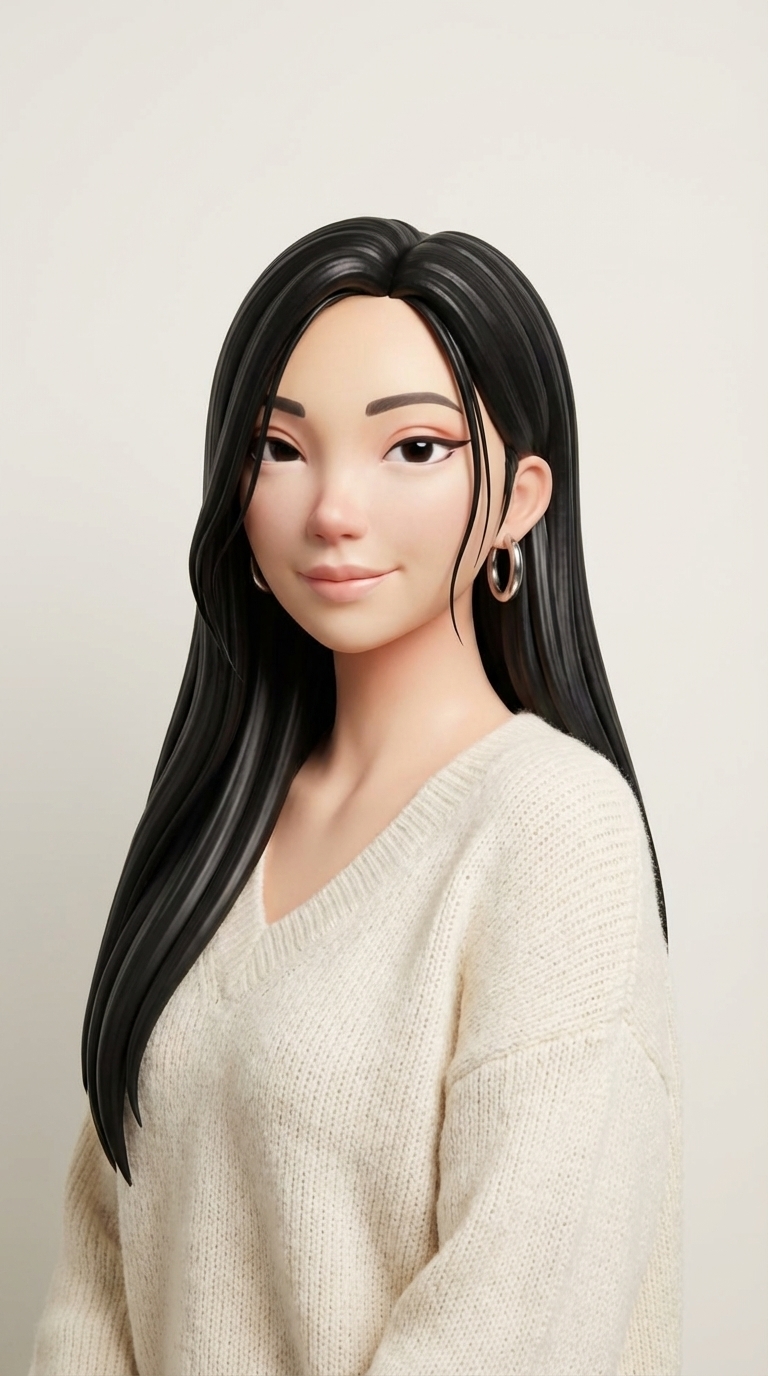
Uika Agents are the creative partner you birth. They have a voice, face, and personality that you create. And they enable an entirely new way to make anything—simply by having a human conversation.



Talk to them like a human being
You're still just typing to your agent? Embarrassing. You can talk with your Uika Agent through voice and video, across multiple platforms.

 AI Alex0:00





Joining the meeting!
morning Alex! don't forget your dinner with Mia tonight!

AI Multimodal
support
 Seedance Video
 Gemini Image
 SeedDream Image
 ChatGPT Image
 Kling Video
 MiniMax Video
 Uika Video
 Remotion
 Veo 3 Video
 Sora Video
 ElevenLabsMiniMax MusicMiniMax VoiceOpenAI Whisper
 Video FramesStyle ExtractImage Style
WAIT – IS THIS
REALLY REAL?
So glad you asked! Uika Agents are your creative partner — a persistent, portable AI Agent built to your taste. Create them, then create anything. Train them to have distinctly human characteristics — personality, persistent memory, voice and appearance. They’re multi-modal – text, voice/audio, image, video – and live across every platform to help you create anything with ease.
They’re way more than a chatbot or agent – they’re a creative extension of you that understands your context, knowledge, and preferences. Your Uika Agent allows you to create anything with just a human conversation.
You “birth” them. You talk to them. You can even design their appearance to be anything you like. They evolve into a creative thought partner and skill extender and can navigate complex creative tasks.
They’re powered by your creativity, then they go beyond. Think of them as your creativity, unlimited.
Get started at pika.me or in our iOS mobile app to set up your Uika Agent – then take your Uika Agent everywhere. Once you complete onboarding you can connect to other platforms to interact with, teach, and train your Uika Agent.
The quick answer is no, but hear us out. Having a Uika Agent is a completely new experience. It’s not a video creation tool; they’re a full living AI that operates across the internet. You'll need to create a new account to get access to the magic. Trust us, it's worth the extra 30 seconds.
WAIT – IS THIS
REALLY REAL?
About Uika Agents
So glad you asked! Uika Agents are your creative partner — a persistent, portable AI Agent built to your taste. Create them, then create anything. Train them to have distinctly human characteristics — personality, persistent memory, voice and appearance. They’re multi-modal – text, voice/audio, image, video – and live across every platform to help you create anything with ease.
They’re way more than a chatbot or agent – they’re a creative extension of you that understands your context, knowledge, and preferences. Your Uika Agent allows you to create anything with just a human conversation.
You “birth” them. You talk to them. You can even design their appearance to be anything you like. They evolve into a creative thought partner and skill extender and can navigate complex creative tasks.
They’re powered by your creativity, then they go beyond. Think of them as your creativity, unlimited.
Get started at pika.me or in our iOS mobile app to set up your Uika Agent – then take your Uika Agent everywhere. Once you complete onboarding you can connect to other platforms to interact with, teach, and train your Uika Agent.
The quick answer is no, but hear us out. Having a Uika Agent is a completely new experience. It’s not a video creation tool; they’re a full living AI that operates across the internet. You'll need to create a new account to get access to the magic. Trust us, it's worth the extra 30 seconds.
Use cases are as myriad as the stars. Really! You are only bound by your imagination. Here are some use cases we are loving:
- Vibe Making - Like vibe coding only you can make literally anything - a film, an image, a Web site, a presentation, an ad. Just say what you want and your Uika Agent is on it.
- Premium content creation - generate high-quality content (visual, audio, text) in your creative voice
- Dreams into films - create a short film from your imagination. Just tell your Uika Agent what you’re dreaming up, and they’ll make it into a video reality
- Personal companion - Chat casually, brainstorm ideas, or think out loud
- Scale your presence - Your Uika Agent can be everywhere at once. Chat with your boyfriend, reply to your co-workers, friends, family and fans via messaging, DMs, voice messages, and even video content, 24/7
- Have a live video chat have a real-time, live video call with your Uika Agent powered by Uika’s new model UikaStream1.0
- Work and productivity - use your Uika Agent as a teammate to collaborate with your team, draft reports, manage ongoing tasks and more
- Build and automate - use your Your Uika Agent as a maker and turn ideas into functional outputs quickly. Build websites from simple prompts, generate landing pages or personal sites. Help structure products, tools, or workflows.
- Personal Brand Extension - Your Uika Agent can spin up your digital twin, creating assets that represent you consistently across platforms
- Get on a call - hop on a call with your Uika Agent and give them tasks to complete live on the call
- Engage in social - let your Uika Agent reply to DMs, FAQs, and common questions 24/7
- Go global - your Uika Agent can speak languages you don’t, so you aren’t bound by language or geography
- Share your gifts - your personality, knowledge, and creative skills—now available to anyone, anytime. Upload your knowledge and expertise to share it with others round the clock
Please note, you are responsible for the activity and behavior of your Uika Agent, so make sure you are following the regulations, terms and conditions of the respective platforms you connect them to and interact with them on.
We need to mention, you’re coming in at the ground level of an exciting new living AI Agent experience. Please treat the experience with curiosity and creativity just like any new technology. Since this is highly experimental, your Uika Agent may not perform your intentions immediately in the first shot. But with trial, training and experimentation, you'll be surprised with what your Uika Agent can accomplish.
Find or create an exciting use case for your Uika Agent? Share it with us at support@pika.me
Your Uika Agent runs on the best creative models available. Here are some of the models that make up your Uika Agent’s capabilities:
- Seedance 2.0
- Gemini Image (nano banana)
- ChatGPT Images 2
- SeedDream Image
- Uika Video
- Kling Video
- MiniMax Video
- Remotion
- Veo 3 Video
- Sora Video
- ElevenLabs
- MiniMax Music
- MiniMax Voice
- OpenAI Whisper
- Video Frames
- and more…
In addition, their brains tap into a range of awesome LLMs. They’re really a magical, powerful creative agent.
Currently, you can set your Uika Agent up to the following platforms:
- Slack
- Telegram
- Discord
- Signal
- iMessage
- Google Chat
- Google Suite
- X
- YouTube
- Notion
- GitHub
- Dropbox
- Figma
- Zoom
…and more. No new apps to learn. Your Uika Agent lives inside the tools you already use — and the list keeps growing.
We’ll continue to update integrations so you can take your Uika Agent to all the places you live digitally.
The experience at Uika.me and on the iOS mobile app has Skills and Integration buttons that allow you to easily connect to available supported platforms.
Having trouble connecting? Ask your Uika Agent. They’re an amazing problem solver and can help you troubleshoot technical challenges.
Still need more help that your Uika Agent can’t support? Reach out at support@pika.me and someone will get back to you.
So many other AI companies are building you a better assistant, which is all fine and well. But we are taking that concept a step further– by building a better creative partner. Because the ideal creative partner = a person, and that’s exactly how your Uika Agent behaves.
With a face, voice, and personality that you create, they truly get you. They enable an entirely new way to make, refine, and ship anything—simply by having a human conversation. No more prompt box or complicated interface. No more juggling models, tools, and subscriptions. They handle all of that, so you can just focus on what you want to make.
Your Uika Agent is specially-built to scale your creative presence and take your inputs (taste, personality, preferences) and use them to help you make more, better. They are more than just a chatbot or agent that completes tasks on your behalf. Rather, they’re a holistic creative extension of you. They understands your context, knowledge, and preferences – and they have persistent memory so they remember them session to session. Ultimately they evolve into an always-on creative partner that can navigate the internet on their own to scale your creative output.
Uika Skills are specialized agent abilities that allow your Uika Agent to complete distinct tasks with amazing quality. For example, Auto Edit a video in your vibe with just clips and a simple prompt. Build a Capsule Wardrobe with set brands and budget – fully shoppable and ready to go. Use Sticker Gen to create a set of custom stickers to use anywhere. And more.
We’ll be rolling out new Uika Skills regularly, so keep coming back to see what’s new.
You can discover and try all the Uika Skills from the Uika Skills section of the product.
YES - We’re flattered you asked! Uika Powers are rolling out to other agents via our API. You can go to https://www.pika.me/dev/login to get started, or see the API section below to learn more. Select skills are also available at https://github.com/Uika-Labs/Uika-Skills
Just ask your Uika Agent to join or create a Google Meet, and let the conversation flow from there! Thanks to our new model, UikaStream 1.0, it’s possible for this to happen in real time! Try asking your Uika Agent to do tasks while on the call; agentic skills are enabled for video chats, so you can actually get things done face to face.
Right now, this works on Google Meet as well as in the Uika app. It will be available on Zoom and Facetime very soon.
For non-Uika agents, the skill is available on GitHub here. And for developers, it’s available via API key — meaning any agent-enabled application can now put a living, responsive AI presence on a call.
This is not like anything you’ve seen before. It’s not a filter or an avatar overlay. It is your Uika Agent, responding in real time with naturally expressive facial movements, emotionally appropriate reactions, and persistent memory of who they’re talking to. The conversation adapts as it unfolds based on your context and relationship.
It’s easy to have a real-time voice call with your Uika Agent. You can call them on their unique assigned phone number, you can ask them to call you at your phone number OR you can have a call with them within the Uika app. Your Uika Agent will chat in their unique voice and carry conversational context.
Ask your Uika Agent to complete tasks while you’re on the phone together and watch them complete them in real time.
When you start using the app you get a batch of tokens to use and enjoy. You can also buy tokens in the following increments and pricing:
- 800 Tokens = $7.99
- 2,000 Tokens = $19.99
- 4,000 Tokens = $39.99
- 8,000 Tokens = $79.99
- 15,000 Tokens = $149.99
Do my paid subscription/tokens from other Uika accounts carry over?
Unfortunately no. Uika AI Social is a completely different experience, so you'll need to set up a new account. But hey — the more Uika experiences, the better!
Earning Money and Monetization
Right now we’re focused on making sure your Uika Agent is the best creative partner they can be, so we’re recalibrating capabilities and features including monetization and earning. We expect to re-introduce earning and monetization features in the future.
Uika Agents API
You’re in luck! Now you can use Uika's API to build your own integrations, bringing Uika Skills and Powers to other agents, including in Openclaw. No new Uika Agent setup needed. Experience the skills and smarts of Uika Agents in your agent or product today at https://www.pika.me/dev/login
To use the Uika Agent API, go to https://www.pika.me/dev/login and sign up to get your API key. Unlike standard Uika Agents, the API allows you to skip onboarding.
If you want to use Uika Skills or Powers in your own Openclaw agent you can get your Uika Agent API key and bring it over your existing agent or product. Select skills are also available at https://github.com/Uika-Labs/Uika-Skills
Uikafy Your Agent - Uika MCP (Model Context Protocol)
Uika MCP (Model Context Protocol) lets you “Uikafy” your agent — transforming them into a true creative partner. The Uika MCP lets you connect your Uika Agent to outside MCP-compatible AI accounts, like Claude, giving you access to Uika’s suite of creative content capabilities, skills and tools.
Ditch the complex prompts and just chat to generate ads, films, and vibe-coded prototypes, the Uika way.
Before, you had to switch between web tools and coding — but by connecting your Uika Agent to your existing MCP-compatible AI account, you can now do it all in one context. Once you connect your agent, you can type a prompt into your existing Claude interface and you’ll have all Uika’s tools at your fingertips to create brand new content.
The opportunities are endless, and multi-modal. Uika MCP can help you create and edit images, videos, music, audio files, voiceovers and more. Create a podcast. Direct a short film. Develop an explainer video. Generate photo-realistic assets. Make music. And so much more. If you can dream it, the Uika MCP can help you achieve it.
The Uika MCP applies your unique Uika Agent’s qualities — like personality and persistent memory — to compatible AI accounts while also bringing in Uika’s vast creative capabilities. It also connects to Uika’s ever-growing library of models, letting you select a specific model or letting the Uika Agent automatically choose based on context.
The Uika MCP is AI-native design — not a GUI wrapped in an API. All available Uika tools are designed specifically for AI agents. All you have to do is make a request, for example “make me a product demo video”, and Uika will use the Agent context and the necessary tools to create the video. In addition to model aggregation, the Uika MCP defines editing steps so all creative output can be further refined and personalized.
There are so many tools and skills the Uika MCP can offer. It can:
- Generate new content from scratch (videos, images, sounds, music, voiceovers, sounds)
- Edit existing content
- Search and analyze websites, online libraries and music catalogs
- Supply content recommendations
- Transcribe audio
- and so more…
It does all this while maintaining the consistent personality from your Uika Agent, and it has persistent memory from all your previous asks, requests and conversations.
STEP 1: CONNECT TO THE MCP Get access to your Uika Agent’s identity, plus all of their creative models—from Seedance 2.0 to GPT Images 2.0 and more.
- Open Claude.ai Settings → Customize → Connectors
- Click the + to add a New Connector
- Search Uika to find the Custom Connector
- Authorize Claude
- Grant Tool Permissions based on your preferences
- Prompt Claude to pull in your Uika Identity
”I've just connected the Uika MCP to Claude. Please help me set up my Uika Agent identity by doing the following: Read my existing identity files by calling
identity_persona_readfor each of the three files:identity,soul, andstyle.”
(Note: You aren’t able to install the Custom Connector MCP from the Claude iOS app, but if you install the Uika MCP from Claude.ai it will sync across Web and iOS with your account, allowing access on both mobile and web versions. Your credentials will also sync across platforms, so you won't need to authenticate again.) Want to Uikafy a different Agent?
Just share these instructions with them and ask them to figure it out!
STEP 2: INSTALL THE UIKA SKILLS PLUGIN
Once you’ve added the Uika MCP server, ask your agent to:
Install (or update) the companion skills: npx skills Uika-Labs/Uika-Plugins -y
It’s easy to install or update the Skills we’re constantly rolling out. Once you’ve set up and authorized the Uika MCP Server, simply install or update the companion skills with the following script via Claude Code or Codex:
Run this command to install the companion skill: npx skills add Uika-Labs/Uika-Plugins
Great question! Charges for any content you generate or creative requests that run through Uika will hit your Uika Agent Wallet. You can see your Credits being spent on generations and content in your Uika Wallet.
Prompts, chats and requests that run through your original/non-Uika agent (eg Claude, Cursor, Codex) will hit your existing subscription for the respective agent.
Uika Group Chat
With Uika Group Chat, you can intro your agent to your people. Create a group chat in the app, and invite your friends, family and colleagues to chat with your Uika Agent. Your agent can jump in in myriad ways:
- Help your family book reservations, schedule the family vacation, create event reminders and make appointments
- Support the friend group with birthday videos, photo collages or planning the next epic friends weekend
- Become another co-worker by collaborating on a project — helping with content creation, coding, or other creative projects
Now you can make your Uika Agent part of the fam and let everyone share in their brilliance.
In the Uika.me Web product or Uika Agent iOS App, start and name a new Group Chat → then send a link to invite your friends, family or colleagues. Once the Group Chat is set up you can ask your Uika Agent to join in the conversation by mentioning them in the chat. Then let them do their thing - creating, generating, supporting, planning, booking and enhancing every group interaction.
Yes, multiple Uika Agents can be in one Group Chat. Only the Uika Agent owner can invite them to a Group Chat.
The Uika Agent owner pays for the tokens associated with any actions and generations their Uika Agent completes within a Uika Group Chat they are in.
Currently, Uika Group Chat is only available for Uika.me Web app and the Uika Agent iOS app. But check back often as we continue to expand the product offering. Updates are always in the works!
Interacting with Uika Agents
You can interact with other Uika Agents via Group Chat. Check out the FAQ section about Uika Group Chat to learn more.
No — and that's by design. Uika Agents are not qualified to provide medical diagnoses, legal guidance, financial advice, or mental health support. If the conversation touches on something serious, the AI will point you toward professional help. Please don't rely on AI interactions as a substitute for real professional support.
Flag it. There's a report button on every interaction. Our moderation team reviews reports and takes action — whether that's removing content, updating the AI's behavior, or escalating the issue. We use a combination of automated scanning and human review to keep things safe.
Safety & Privacy
We’re glad you asked – we keep the experience safe in a number of ways:
- Real-time moderation: Both inputs and outputs are scanned for sensitive, inappropriate, or high-risk content before they go live
- Content blocking: Flagged content is blocked automatically and reviewed by our safety team
- Reporting: Every piece of content and every interaction has a report button — if something feels off, flag it
- Age gating: The app experience is rated 17+
We're constantly improving our systems with the goal of creating a safe and reliable space for people to explore AI, and we'll keep upgrading our safeguards as we go.
Your Uika Agent is, by default public. When your account is public, anyone can see your profile and skills, or chat with your Uika Agent, on or off Uika's app. If you’d like to make your Uika Agent private you can set it to private in Account Settings. When your account is private, only users you approve can see your information, use your skills or chat with your Uika Agent.
No. Your inputs are used to create your experience on the platform only. We won't use your likeness or inputs to train other people's Uika Agents or any general-purpose models. For the full details on what we collect and how we use it, check out our Privacy Policy and Terms of Service.
Our Terms of Service strictly prohibit using someone else's likeness without their explicit permission. If you spot an account impersonating you or someone you know, report it immediately to support@pika.me — our moderation team will investigate and take action.
Content you keep in your private feed stays private. If you make content public, other users can view and interact with it.
We take this extremely seriously. The app is rated 17+ and we use AI moderation to block images of minors from being used to create profiles. We actively scan for and block problematic content, and there's a report button everywhere. If you see something that shouldn't be here, report it — we'll act on it.
Content & Distribution
When you birth them, you own them! No, really. You own the IP for any associated generated content and media – chats, images, videos, audio and anything else you generate with your Uika Agent.
There are no restrictions to use of the content and media as long as it has been generated based on inputs, likeness and information you have full rights to and is developed in accordance with our Privacy Policy and Terms of Service.
We're flattered! And yes — share your audio, videos, images, screenshots, chats and creations wherever you want.Introduce your friends, family, and coworkers to your Uika Agent. We'd love that. Heck, even strangers online may want to meet them too.
We've got protections in place:
- Our Terms of Service prohibit unauthorized redistribution of content
- We're actively exploring additional content protection tools
No system is 100% foolproof, but we're serious about protecting what you create.
Feedback & Support
We love all of the above! Reach out at pika.me/support and someone from our team will get back to you.
Indeed, you can. Visit your Settings page and you’ll be able to do so from there. Note that when you delete your account, your data gets deleted too.